Phone bashing is my calling

Kyocera 7135: I had to laugh at this photo collage of some frustrated user busting a few caps in his Kyocera 7135’s ass. I have two coworkers with the 7135 Palm phone, and besides the fact you look like a geek toting around this monstrous phone, its problems are legion. One coworker had his crash several times a week, and even considered asking Bell Mobility to let him just keep the cheapo loaner Nokia 3865.

My other colleague seems to have a patched version, although he doesn’t like the interface. It seems like the Palm UI was grafted onto the phone’s UI, so sometimes you can use the touchscreen and sometimes you can only use the numeric keypad. Dialing numbers while driving is impossible, since you’d have to whip out your stylus, press “Main”, click “Address Book”….

Motorola MPx220: PocketPC phones are not immune to the same problems, it seems. My sister had a prototype of the MPx220; some wag at Windows Mobile gave her one. She thought it was great; she could check her mail and MSN and Outlook calendar and take pictures and everything.

So I asked her how was the RF quality? “Actually, it keeps dropping my calls,” she said sheepishly.

But hey, who needs a phone for talking when it’s got a mean game of Solitaire?

Get the facts on the facts

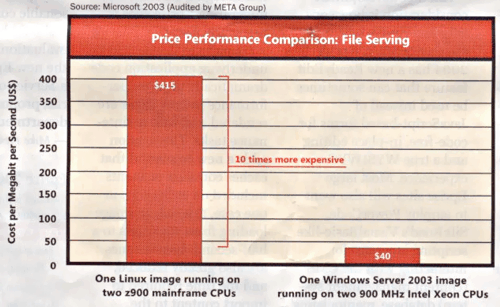
Microsoft doesn’t want you to defect to Linux. However, instead of pointing out Windows’s obvious strengths, they have decided to harp about total cost of ownership, a metric that is debateable and non-consistent at best. It doesn’t help that their proof – in the form of Microsoft-funded studies – seem to be stacking the deck in MS’s favour. Take this excerpt from a Microsoft “Get The Facts” anti-Linux advertisement seen in InfoWorld:

windowslinux.gif

Wow. Imagine that. A mainframe costs more to purchase and maintain than a personal computer.

As always, the best way to check the validity of any claim is to ask questions. ZDNet UK has offered some helpful questions to Microsoft salespeople to give them the chance to clarify their statements. My favourite:

“Why shouldn’t I replace Microsoft Office with Open Office, or Internet Explorer with Mozilla? Won’t this work as an excellent first step towards full-scale open source deployment, given Microsoft’s commitment to openness and interoperability?”

Even the so-called “success stories” should be scrutinized. ZDNet points out that at least one organization that chose Windows over Linux because MS appeared cheaper, the London borough of Newham, may have in fact been offered an “uncharacteristically generous package, including a substantial amount of free consultancy, to sweeten the deal.”

“We’re winning, people.”
That’s what the outspoken Eric Raymond concluded as he dissected Microsoft’s latest Get the Facts marketing push. “Microsoft has failed to stop us with better software technology or lower prices; they’re incapable of the former and their business model wouldn’t survive the latter.” Raymond dismisses Get the Facts as mere “semantic warfare” and “an obvious circle the wagons move”.

Certainly no one product, Windows or Linux, is the be all that ends all. However, methinks that if your product is truly superior, there is no need to belittle the competition. Fight with facts, not with mud.

Real life is just another window

CNN reports where the Internet-enabled, laptop-toting children of today, the Generation I if you will, have made technology as indispensible extensions of themselves. Nothing new here: Marshall McLuhan postulated that computers would amplify humanistic intelligence, in the same way that sliderules and calculators augment our mathematic skills.

Steve Mann of the University of Toronto took the extension theory to its logical extreme by augmenting himself with a series of wearable computers and cameras that allow him to interact with and record his surroundings.

As usual, the kids figured it out first. The computer isn’t just a grey box in the living room for surfing eBay: it’s a familiar that connects and enriches their very lives.

Where information is free and readily available, it has increasingly become a world where it’s not what you know, but where to find it, how to interpret it, and who to talk to. The ability to forge relationships (both in the causal and social sense) becomes even more precious.

A jolly rogering

When I moved back to Toronto, I discovered I wasn’t allowed to stick my ExpressVu satellite dish on the building, so I had no choice but to obtain my television from our local cable monopolist, Rogers Cable.

Because we are such a valued customers, Rogers has awarded us by putting me on their email spam list. Every month I get sales pitches for the latest Rogers whatzit. And what happens when you click on “unsubscribe”?

stupidrogers.jpg

Well, you have to fill out a giant form plus urine sample and signed letter from the Queen to get removed off the list. All fields are required to be filled in. Oh yeah, your wireless cellphone number is also a required field, so, you know, Rogers can be extra extra sure that you are you and they’ll never stick you on their telemarketing list, cross their hearts and hope to die.

The funny is, after sending off this form (I put down a fake phone #), I am still getting the Rogers spam newsletter.

I wonder what A+ professionals preferred

Possibly the most unscientific of polls, but the Training Company polled 200 of their students to see what they had on their MP3 players. The Register reports:

Job: Microsoft-certified professionals
Top three bands:

1. Britney Spears
2. Dido
3. Beyonce

[snip]

Job: Linux
Top three bands:

1. The Orb
2. Underworld
3. Kraftwerk

Security, developers, database administrators, project managers and CIOs were also featured.

In other news, A+ professionals were said to prefer “Happy Birthday”, “London Bridge”, and the “My Little Pony” Original Soundtrack.

Beauty and brains

243S_WeightForwardHammer.jpgSomething fascinating is created when one fuses form and function. Witness the finalists of the 2004 Idea Design Excellent Awards (IDEA).

My favourite is Farm Design’s Weight Forward Hammer. It has an elongated, smooth top makes it easier to less damaging to take out nails, while its continuous curved shape makes it easier to pound nails in with less effort. The fact that it looks like it travelled through a temporal distortion from the 24th century doesn’t hurt, either. It’s a simple concept, yet they managed to refine it into a higher level of usability.

Other winners include everything from a cardboard toilet (once it’s done, you can burn it for fuel!) to a cocoon-like kidney transporter to this really cool Umbra salad bowl. Amusingly, Apple seems to have pulled a Lord of the Rings and carried off a multitude of awards, including ones for the G5 and iPod Mini. [from engadget]

Robots make it easier to part with your money

In a matter of months, Bell Canada will make it easier for Dexit tag users (like me) to funnel cash into their RFID tags. Using voice recognition and authentication, people can just pick up the phone, dial the Dexit 1-800 number, and say, “Hey, it’s me Bob. Stick $20 more in my account.”

There’s been a Dexit stand in the basement of where I work, hawking these tags for the past two days. All the employees even got an email to come on down.

Bell Canada has had great success in using voice recognition in fielding their own service calls. When calling 310-BELL, Bell’s consumer hotline, customers can interact with a chip voice called “Emily” that will point them to the right department. It uses Nuance’s SayAnything software, and they plan to roll it out to all of Bell’s subsidiaries.

Too bad they can’t get robots to pay that $1.50 refill fee too. That would be lovely.

Duh, what’s the Internet, political parties say

One of my local candidates recently had left an automated message on our answering machine proclaiming his support of “safe neighbourhoods, good health care and the care of the elderly”. Just in case, you know, since all the other candidates are running for unsafe neighbourhoods and the mugging of senior citizens. With all this rhetoric and mother-truthing, three groups decided to ask the dominant Canadian parties what their plans were for privacy, copyrights, spam, and open source software. The Toronto Star also covered this topic.

Unsuprisingly, the political parties seemed to not have any clue what they were talking about. The Liberals, NDP, Bloc and Greens nebulously stated they were “looking at the issues”.

The Liberals were the first to respond, pointing out they created an anti-spam workforce, and also launched the infamous CDR tax levy.

The Greens probably responded the most lucidly, claiming they were for music sharing and open source, but didn’t get into many details.

The NDP and Bloc had no position on open source software, but agreed that spam = Bad!

The Bloc answered back in French, but that’s okay if you don’t understand la belle langue because every answer was the same: look up the Bulte Report, an interim government study done by my local Liberal candidate which basically approves Internet censorship.

Unsurprisingly, all four parties said that national IDs were bad.

The Conservatives didn’t bother to respond.

In any case, if you’re Canadian and haven’t voted yet, go vote. And remember, don’t eat your ballot, it’s illegal.

Mozilla’s Top 10 Extensions

mozillacontextmenu.gifProbably one of Mozilla’s most powerful and yet overlooked features is its extension support. By installing these tiny plugins, you can give Mozilla extraordinary new abilities. Extensions are written in XUL, Mozilla’s cross-platform rendering language, and given an “XPI” file extension (Nosy Programmer tip: they’re actually ZIP files – rename their extensions and see!).

There are dozens of extensions available on Mozdev, ranging from bookmark backup makers to blogging tools to parlour games.

Here are my Top Ten Mozilla Extensions. These are the extensions I personally consider indispensable, the ones that scratch my itches:

CuteMenus: Adds pretty colourful icons to your browser menus. Might as well surf in style.

TextLink: Lets you access URLs written in plain text with a double-click. One of the many extensions that are simply little hacks that brighten your day just a bit more.

Dictionary Search: Just select a word on a webpage, click open the context menu, and you can search for that word on Dictionary.com or up to thre other search resources of your choice. I put Feedster and Wikipedia there too.

Web Developer: A set of tools that are invaluable to any web designer. Want to see what your page will look like in 800×600 resolution? Want to extract all the CSS data on a webpage, find broken images, or validate HTML in two clicks? It’s all there.

IEView: Every once in a while, you’ll run across a page that doesn’t work right in Mozilla. It ain’t the red dino’s fault – the webmaster obviously didn’t care enough to follow proper HTML standards. You can contact the webmaster about this faux pas, but in the meanwhile, you can use this workaround: click open the context menu, click “View This Page in IE” (if you have IE installed).

mozilladiggler.gif
Diggler: It sits on the left hand side of the Location Bar, and provides a myriad of little options for surfing sites. For example, you can move up the directory tree, toggle popups and images on and off, and more.

QuickNote: Did you ever want a virtual scratchpad so you can quickly cut and paste an address or number off a website? You can load QuickNote in a tab or in a separate window, and it periodically saves everything automatically in plain text files. I’m proud to say I designed the icon for this extension. 😎

Multizilla: If you’re enjoying the power of tabbed browsing, this extension is worth a look. You can reopen closed tabs, make new windows open in tabs instead, and more.

Honourary Mention: Single Window Mode does roughly the same thing.

Tagzilla: Lets you automatically insert a random tagline into the bottom of email messages or website textareas. Taglines are basically pithy witticisms and quotations you store in a text file. If you’ve ever use BlueWave Offline Reader to read mail off a BBS, you know what I mean.

BugMeNot: You know those annoying news sites that make you register your name, email, and blood type just so you can see their fricken’ article? The next time you’re confronted with a registration screen, click open your context menu, click “BugMeNot”, and log in without having to type anything in.
The best independent studies money can buy

I hate Scoble
And I hate Microsoft too,
They patented the double click and kinetics
In hopes that they can someday sue

They sent Ken Brown after Linus
spreading uncertainty far and wide,
Standards they extend and extinguish,
while pretending to be on our side

“Linux is like a cancer!”
Say Redmond-backed “independent” shills,
It costs too much unless it costs too little
In case you’re the country of Brazil

Even the European Union
Thinks that Microsoft’s gone insane
“Their salesdroids are hindering competition,
“It must be the free Talking Rain!”

But maybe I’m being too hard on Scoble,
And unfair to Microsoft too.
I like my Internet Keyboard Pro
The FTEs are just human, true

They’re not all living rich on Mercer Island,
Although they’re smart and clever
No one can challenge their work ethic,
Plus they made Flight Simulator

They may suffer from Asperger’s, hubris,
or “Not Invented Here” for sure
But that’s easy to see when they get Windows XP for dollars 30
At the Microsoft Company Store

Just open your checkbook,
Just click “I accept”,
Let them control your music
Let your consumer choice be forfeit.

But I can tolerate the constant security exploits
I can take the lousy CSS support in IE
But there is one thing I cannot forgive nor forget…
And that’s the delay of Halo for the PC.

Of course I don’t hate Scoble. How can you hate someone you’ve never met? As for Microsoft, they do good things and bad things. However, I wish they did more good things.